Technology
webMathematica integrates effortlessly with standard web technologies. You choose, install, and configure the web server, Java, and servlet container of your choice on the supported platform of your choice.
Processing Requests
webMathematica Pages
Specifications
Compatibility
How webMathematica Processes a Request
1. Make Request
2. Acquire Kernel
3. Process Page
4. Release Kernel
5. Return Result
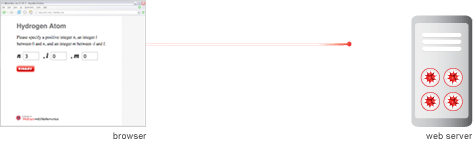
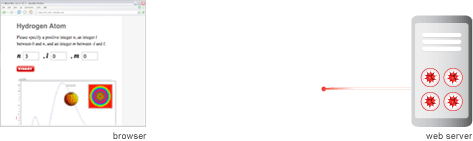
The browser sends an HTTP request to the web server. The request
references a particular webMathematica page and includes
variables and their values. Then the web server performs any
preprocessing steps, such as authentication, and forwards the request to
webMathematica.
Next step»
1. Make Request
2. Acquire Kernel
3. Process Page
4. Release Kernel
5. Return Result
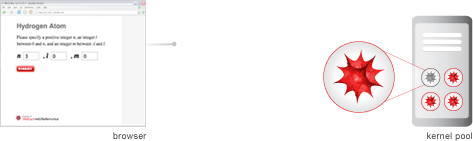
webMathematica's kernel manager acquires a Mathematica
kernel for the request from a pool of preinitialized kernels. Any
variables and values are sent to this kernel.
Next step»
1. Make Request
2. Acquire Kernel
3. Process Page
4. Release Kernel
5. Return Result
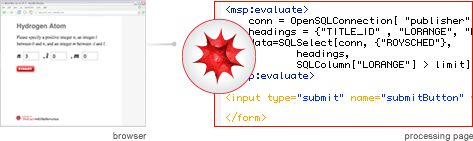
The Mathematica kernel loads the web page and processes any
webMathematica tags. The kernel builds and then returns the result.
Next step»
1. Make Request
2. Acquire Kernel
3. Process Page
4. Release Kernel
5. Return Result
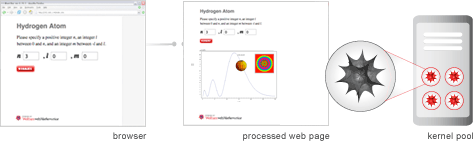
webMathematica accepts the response and adds all of the necessary
HTTP headers for return to the browser. webMathematica then
clears any temporary settings in the Mathematica kernel and
releases the kernel to its pool of available kernels.
Next step»
1. Make Request
2. Acquire Kernel
3. Process Page
4. Release Kernel
5. Return Result
The web server performs any postprocessing steps and returns an HTML
response—which may use applets, plug-ins, or other features of dynamic HTML—to the browser.
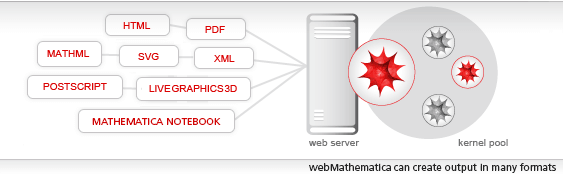
Alternatively, the response can be in some other format, such as MathML, TeX, or a Mathematica notebook.
View next technology»
Processing Requests
webMathematica Pages
Specifications
Compatibility
webMathematica Pages
webMathematica is based on Mathematica and two standard Java technologies: Java Servlets and JavaServer Pages (JSP). Servlets are special Java programs that run in a Java-enabled web server, which is typically called a "servlet container" (or sometimes a "servlet engine"). There are many different types of servlet containers that can run on many different operating systems and architectures. The servlet containers can also be integrated into other web servers, such as the Apache web server.webMathematica allows a site to deliver HTML pages that are enhanced by the addition of Mathematica commands. When a request is made for one of these pages, the Mathematica commands are evaluated and the computed result is inserted into the page. This is done with a standard Java technology, JSP, making use of custom tags.
webMathematica technology uses the request/response standard followed by web servers. Input can come from HTML forms, applets, JavaScript, and web-enabled applications. It is also possible to send data files to a webMathematica server for processing. Output can use many different formats, such as HTML, images, Mathematica notebooks, MathML, SVG, XML, PostScript, and PDF. The webMathematica User Guide includes examples that show how to produce these and other formats.
View next technology»
Processing Requests
webMathematica Pages
Specifications
Compatibility
Specifications
Constituent Technology Included in webMathematica
- Mathematica 9
- The webMathematica web application, a special configuration of files arranged to run inside a servlet container (includes J/Link, webMathematica packages, and various Java class files)
- The webMathematica kernel manager, providing support for launching and shutting down Mathematica kernels and for configuring and monitoring the site as it operates
- LiveGraphics3D, a Java applet for displaying and manipulating three-dimensional graphics
Documentation and Examples Included in webMathematica
- webMathematica User Guide
- Example webMathematica pages and templates
- Sample configuration files
- Sample applets
- Sample web pages
- Sample images
- Mathematica and Java source code for all constituent technology except Mathematica 9 and LiveGraphics3D
Compatibility
- Server Technologies
Java Servlets and JSP - Supported Java Versions
Recommended: Java 5 or later - Servlet Engines
Any engine compatible with Servlet 2.4 or later, such as Apache Tomcat - Web Servers with Tested Compatibility
Apache HTTP server, Microsoft IIS - Supported Server Systems
Any system supporting Mathematica 9 and Java 5 or later
Miscellaneous
- Security Features
Full compatibility with standard web-server security such as firewalls, trusted hosts, and HTTP-specific features; Mathematica-specific security to prevent execution of system-specific commands - Performance Overhead
Start-up overhead removed by Mathematica session caching, linear performance as load increases, multiple Mathematica licenses supported (suitable for multiprocessor machines), minimal overhead over normal Mathematica computation time
View next technology»
Processing Requests
webMathematica Pages
Specifications
Compatibility
Compatibility
Compatible Server Technology
- Java Servlet 2.4 or later
- JavaServer Pages (JSP) 2.0 or later
Supported Java Versions
- Versions 1.4, 5.0, and 6.0
View next technology»


![[ja]](/common/images2003/lang_bottom_ja.gif)
![[es]](/common/images2003/lang_bottom_es.gif)