Wolfram Compute Services
Instantly scale up your Wolfram computationswith zero-configuration supercomputing
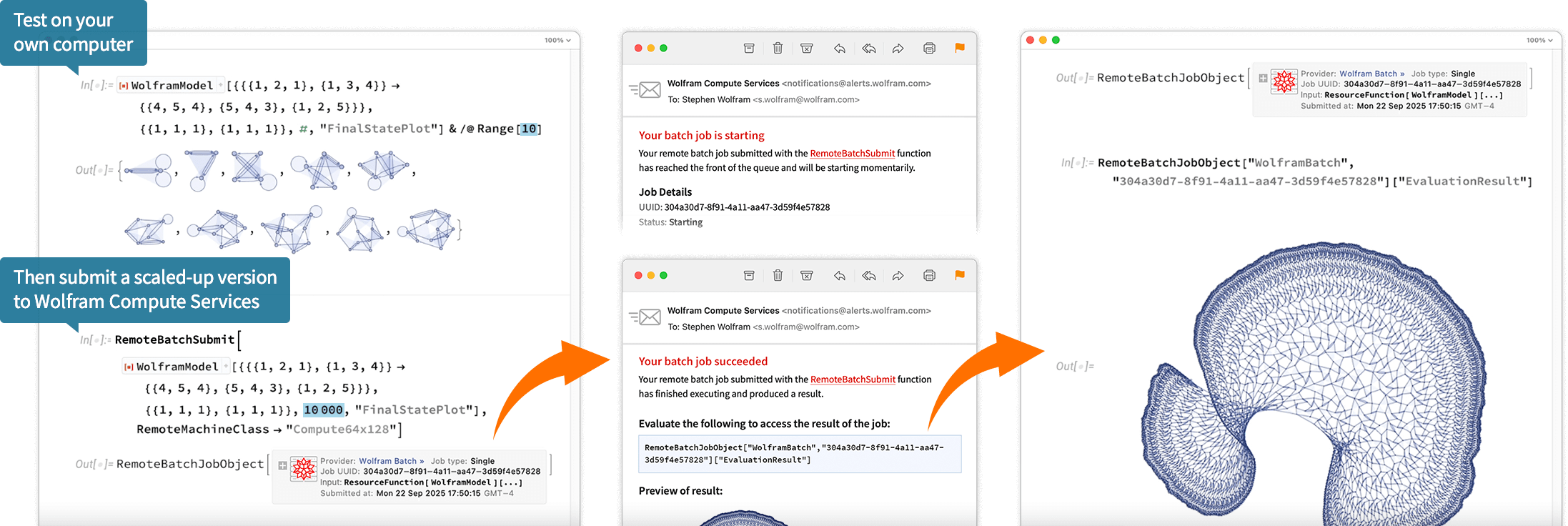
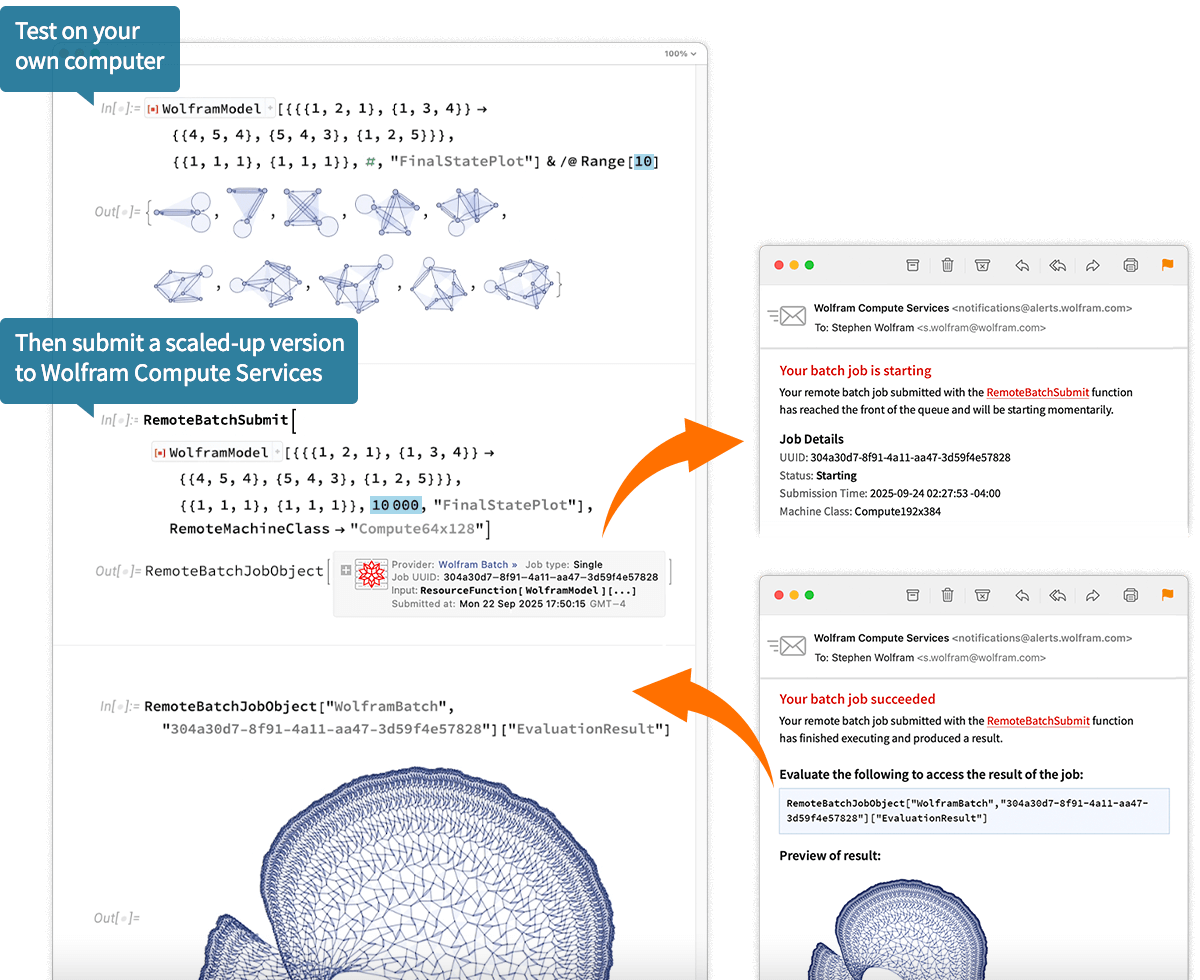
Wolfram Compute Services handles all configuration and orchestration to let you instantly and robustly run any Wolfram Computation at supercomputer scale, with access to large-scale parallelism, large memory, large GPUs, etc.
- Suitable for research, development and production workloads of any scale
- Set up for robust job management and monitoring
- No installation or configuration needed; runs from any Wolfram system
- No separate subscription needed; uses Wolfram Service Credits
Key Features of Wolfram Compute Services

Async Batch Computation Service
Submit jobs and continue working in your session while results are processed in the background.

Job Notifications
Receive email or text notifications when your jobs are complete.

Array Jobs & Dynamic Status Visualization
Launch and manage multiple related jobs as a group. Monitor progress with dynamic status visualizations.

Access to Large Machine Instances
Run your computations on powerful machines with high memory and core count, tailored for demanding workloads.

GPU-Accelerated Compute Resources
Access machine classes equipped with NVIDIA GPUs for faster neural net training/inference and GPU-accelerated algorithms.

US/EU Data Residency Support
With dual US and EU geozones available, your job input/output data is stored and processed within the geographic region of your choice. Learn more
Machine Instance Categories
Wolfram Compute Services offers four machine categories to suit a variety of computational needs.
Basic: For general computation
Basic instances provide cost-efficient computation with balanced resources for everyday computation jobs (like solving numerical systems, creating lots of visualizations, etc.).(GB)
Hour
Memory: For memory-intensive tasks
Memory instances focus on high-memory computations (graphs, exhaustive combinatorial searches, high-resolution image and video processing and more).(GB)
Hour
Compute: For compute-intensive jobs
Compute instances focus on jobs with large core counts for use with Wolfram Language parallel computation.(GB)
Hour
GPU: For tasks using GPU acceleration
GPU instances offer one or multiple locally attached GPUs for accelerated neural network training/inference, CUDALink programming and other GPU computation.(GB)
Hour
(44GiB memory)
(89GiB memory)
Stay in Complete Control of Your Compute Costs
Wolfram Compute Services jobs consume Service Credits, which can be purchased as needed. You can monitor your service credit balance and usage and add credits on your Wolfram Account dashboard. All jobs can be configured with specific credit limits or time limits.
Q&A
How do I enable Wolfram Compute Services in my Wolfram product?
If you are using Mathematica, Wolfram|One or Wolfram Engine 14.3 on your desktop, run RemoteBatchSubmissionEnvironment["WolframBatch"] once to enable. The functionality is automatically available in the Wolfram Cloud now, and will be in future versions of Wolfram desktop clients.
What types of jobs can I launch?
Wolfram Compute Services supports single jobs and array jobs. A single job launches a single machine instance. An array job launches multiple machine instances determined automatically based on the size of the input array. You can specify the method by which the input array is split over machine instances. For more information, see RemoteBatchSubmit and RemoteBatchMapSubmit.
What versions of Wolfram Language are supported?
Wolfram Compute Services batch jobs can be submitted from Wolfram Language Version 14.3 or higher. The submitted jobs are always executed with the latest released version of the Wolfram Engine.
What are my options to store my computation results?
Results are stored temporarily by Wolfram Compute Services for 14 days, during which you can download and store them locally. You can also use functions like CloudPut or the AWS service connection to upload your results to the Wolfram Cloud or other cloud storage.
Can my jobs access the internet?
Yes, any Wolfram Language function that directly or indirectly accesses the internet will work as you expect. Also, all Wolfram Cloud and Wolfram|Alpha services are accessible from your jobs.
Can I SSH into my own job?
No, the batch nature of Wolfram Compute Services does not allow for SSH access to individual jobs.
How do machine classes relate to array jobs?
If you select a machine class for an array job, then that class applies to each child job. As a result, the total rate of credits consumed scales with the number of child jobs. For example, if you launch an array job that launches 16 child jobs, then each child job uses the specified machine class. If your input array has 10,000 elements, then typically 100 elements will be assigned to 100 machine instances. The machine class that you specify determines the class of each of those machine instances.
Can I use my own cloud compute account like AWS or Azure?
Yes, but not via Wolfram Compute Services. Instead, you would configure your own "AWSBatch" or "AzureBatch" provider.
What Wolfram Language functionality is not available in computation jobs?
Runtime compilation of CUDA code (CUDAFunction etc.) is not currently supported.
Can I install custom software/tools for my job?
As part of your own job code, you can install custom software and tools (including your own packages and paclets) as needed for your computation using the RemoteInputFiles option. Note that all customizations will be lost when the job ends.
Do I have to buy Service Credits to use Wolfram Compute Services?
Not necessarily. Many Wolfram subscription plans include a small number of Service Credits. These are enough to try small remote jobs. For larger or more frequent computations, you can purchase additional credits at any time. You can also enable auto-recharge with an amount you choose—helpful if you want your balance to stay topped up.
What happens to my jobs if I run out of Service Credits?
If you run out of credits, all running jobs will be terminated, and new jobs can't be submitted until your balance is restored. Once you add more Service Credits, you can submit new jobs or resubmit any that were interrupted.
How do I check my Service Credits balance?
You can go to your Service Credit Details page in Wolfram Account to view your balance, purchase more credits and review past usage history. You can also query your current Service Credits balance with $ServiceCreditsAvailable from Wolfram Language.
How long are my Service Credits good for?
Service Credits never expire. They remain in your account until you use them.
Can I get a refund on unused Service Credits?
No. All Service Credit purchases are final.
Does Wolfram guarantee the availability of third-party services used through Wolfram Compute Services?
No. Wolfram Compute Services uses third-party compute resources to run remote jobs. While Wolfram integrates them into the Wolfram Language workflow, we do not control their availability, performance or uptime.
What physical hardware does Wolfram Compute Services use?
Physical hardware differs by machine class and may change over time to provide the most up-to-date hardware options.
What environment does Wolfram Compute Services run in?
Wolfram Compute Services jobs run under the Wolfram Engine Docker image, which uses Ubuntu Linux.
How can I make use of multiple cores on a larger machine class in a job submitted with RemoteBatchSubmit?
Parallelization functions such as ParallelMap and ParallelTable will make use of all CPU cores on a remote machine. Furthermore, some language functionality is automatically optimized for multiple cores using parallelization or multithreading. We recommend experimenting with multiple machine classes and optimization techniques to find the best configuration for your use case.