Model, Simulate, Plot & Analyze Using Calendar Time
Use a date picker to set simulation periods and plot results on real-world date-time axes, delivering clearer, context-rich insights.
Model, Simulate, Plot & Analyze Using Calendar Time (1:15)
Use a date picker to set simulation periods and plot results on real-world date-time axes, delivering clearer, context-rich insights.
Model, Simulate, Plot & Analyze Using Calendar Time (1:15)
Create icons that automatically update based on configurations—making setup of complex systems easier to understand, explore and validate at a glance.
Visualize Model Configurations in Diagrams (1:14)
Design energy-smart buildings with the open-source IBPSA library. Simulate building HVAC and district heating or cooling networks using 100+ validated components—ideal for energy analysis, control design and research.
IBPSA Library
Analyze integration of PV systems in buildings, microgrids and hybrid energy systems using the open-source PhotoVoltaics library. Use detailed simulation of cells, modules and full-scale plants with realistic temperature and irradiance effects.
PhotoVoltaics Library
Plan and analyze AC, HVDC and variable-frequency grids with adaptable components and replaceable phase systems using the open-source Power Grids and Power Systems libraries. Ideal for grid planning, reliability assessments and renewable energy integration.
Power Grids Library
Access new components for tasks like signal tracking and benefit from improved features such as CSV table input—expanding your modeling capabilities.
Modelica Standard Library
Adjust gains, time constants or physical parameters on the fly—without restarting the simulation. Quickly explore design variations, run what-if tests and see system responses instantly, saving time and boosting insight, even in large or long-running models.
Live Tuning and Calibration (0:55)
Format your models your way—preserving custom layout, comments and whitespace. Enjoy cleaner diffs and effortless collaboration through GitHub and other version control platforms.
Git-Friendly Formatting (0:41)
The latest version of the OPC UA library enables the creation of scalable and secure industrial applications, including hardware-in-the-loop simulations, digital twin integration and advanced control system development. It incorporates robust authentication, encryption and performance enhancements to support industrial automation needs.
How to Securely Connect Industrial Equipment Using OPC UA
Enhanced GUI support for modeling energy systems such as thermal management of batteries, power profiling of photovoltaic (PV) plants and thermo-fluid performance monitoring of piping networks.
Enhanced Support for Energy System Modeling (1:57)
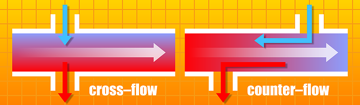
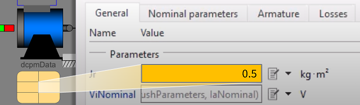
New interfaces to quickly switch and parametrize things like different thermodynamic processes (isobaric, isochoric, adiabatic and isothermal), flow characteristics (laminar, turbulent and transitional) and more.
GUI Support for Editing Nested Models (1:25)
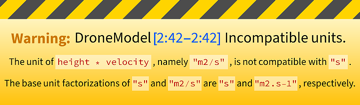
Understand and troubleshoot errors using easy-to-read formatted code in messages.
Clear & Concise Error Messages (1:15)
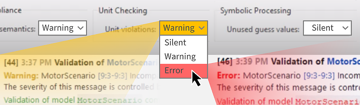
Configure whether errors should be silenced, treated as warnings or treated as actual errors for Modelica compliance, unit checking and symbolic processing.
Configurable Error Handling (1:51)
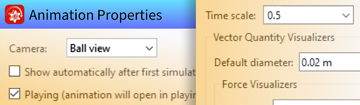
Utilize the new Animation Properties window to configure time scales, default views, visualizer scaling and additional settings. Save these configurations within your model for future use.
Store Animation Properties in Model (1:11)
Automatically publish models and simulations to the Wolfram Cloud, enabling anyone to configure and run their own simulations, as well as gain insights from the simulation data.
Publish Models & Results to the Cloud (1:59)
Test novel designs or identify faults in rotating machineries such as turbines, motors and drivelines. Use premade components of gears, bearings, shafts and many more that contain flexibility, contacts and bearing dynamics.
Bearing Defect
Model battery packs using the new built-in Battery library. Include battery packs in cars, drones and grids to analyze and optimize performance.
Energy Self-Sufficient Buildings
The Clocked library offers higher-level abstractions for dealing with clocking mechanisms, allowing you to model multi-rate systems.
Model Multi-clocked Systems (2:21)
Switch among SI, English (imperial and US) and your own custom unit systems. Add units to your library and detect errors.
Unit Handling (2:34)
Configure your System Modeler packages to install as read only or allow users to access, modify and update local copies of the library.
Collaborative System Modeler Packages (1:29)
Snap to intersections between plot curves when adding measurements. Choose a default plot theme for all plots. Use and save log scales on axes.
Improved Plotting (1:52)
Try
Buy
System Modeler is available in English
and Japanese
on Windows, macOS & Linux »
Questions? Comments? Contact a Wolfram expert »